Most small businesses start with an off-the-shelf CRM, and many should stay with one. Some reach the point where the software decides how they work, instead of the other way round. This guide compares what each option really costs in Canada, shows where each one wins, and walks through three businesses where the answer comes out differently.
Prices checked: October 23, 2026. Vendors change prices and promotions often, so confirm them on the vendor's own page.
The short answer
Buy off-the-shelf when your sales work is a classic pipeline (lead, call, proposal, won or lost), your team lives in email, and you mainly need a shared customer list, reminders and reports. Zoho, HubSpot and Salesforce all do this well, and a small team can start for free or for a few dollars a person each month.
Build custom when the work after the sale is the business: quotes with options, signed agreements, deposits, change orders, work orders, project phases, hours and invoices. When the CRM covers only the first step, people end up copying the same customer and the same job into three or four tools, and that copying is the real cost (what disconnected tools cost you). A custom system is built around those steps and connects them, so each job is entered once.
The middle path: if your CRM fits and only the hand-offs between tools hurt, keep it and connect it to the rest of your tools. Wiring costs less than a rebuild.
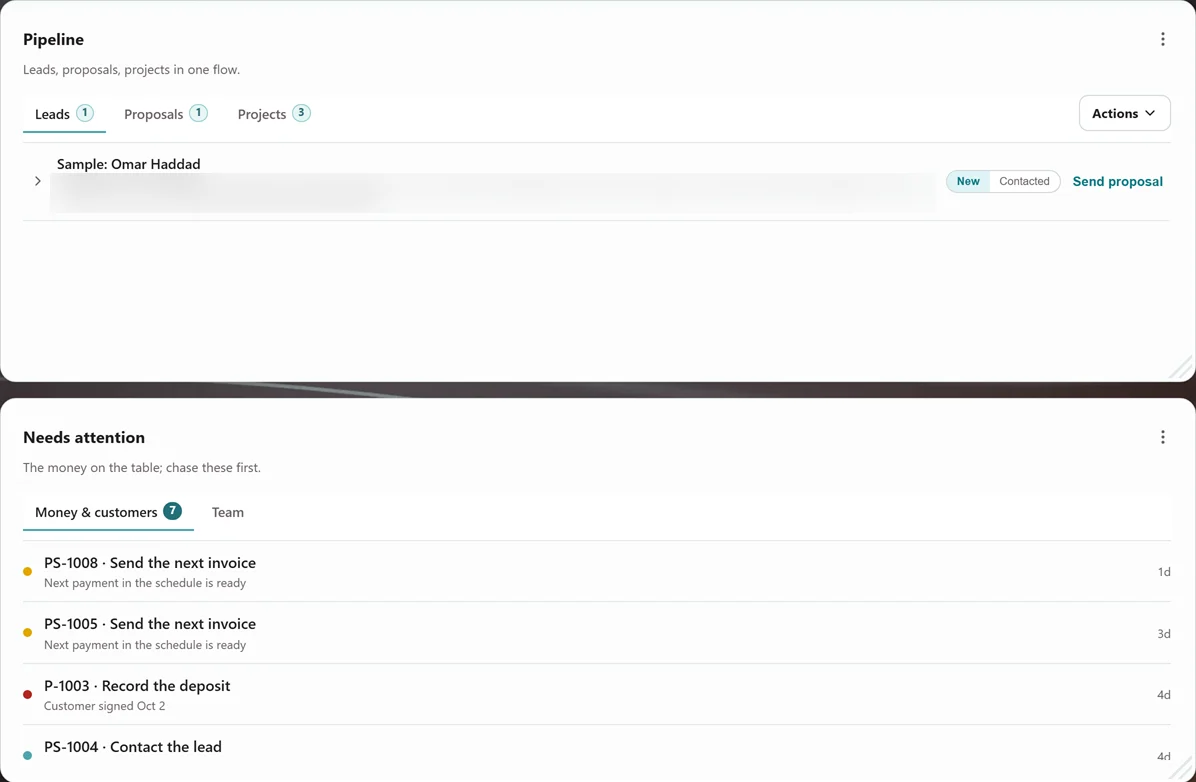
See the full story: the Prosafe Office custom platform and apps we built for Prosafe Plumbing & Mechanical.
What off-the-shelf CRMs cost (October 2026)
| CRM | Free plan | Entry plan | Mid plan | Good to know |
|---|---|---|---|---|
| Zoho CRM | Free for 3 users | Standard: C$19 per user a month | Professional: C$31 per user a month | Prices are for yearly billing; Zoho says yearly saves up to 34% over monthly. Enterprise C$50, Ultimate C$65. |
| HubSpot Sales Hub | Free for up to 2 users | Starter: CA$26 per seat a month (shown at CA$13 on a promotion) | Professional: CA$130 per seat a month, with a yearly commitment | Professional needs a one-time onboarding fee. Enterprise starts at CA$195. AI features run on credits. |
| Salesforce | Free trial | Starter Suite: US$25 per user a month | Pro Suite: US$100 per user a month, billed yearly | The Canadian pricing page shows US dollars only. |
What a team of 8 pays in a year on the mid plans:
- Zoho CRM Professional: C$2,976 (8 × C$31 × 12)
- Salesforce Pro Suite: US$9,600 (8 × US$100 × 12)
- HubSpot Sales Hub Professional: CA$12,480 (8 × CA$130 × 12), plus the onboarding fee
Not counted: add-ons, extra AI credits, a setup partner, and the hours your team spends making the tool fit the work. The bill also grows with every person you add.
What a custom CRM costs
The price of a custom CRM varies widely, because "CRM" can mean a contact list or a whole operations system. One Toronto developer's October 2026 guide puts a custom client portal for a services company at $27,000 to $67,000 CAD, delivered in 3 to 5 months, plus maintenance of 10 to 15% of the build cost a year and hosting of about $120 to $450 a month.
What moves the price:
- Connections: each tool the system must talk to (QuickBooks, payments, email) adds work.
- Steps: every approval, document and status your work runs on.
- People and roles: who sees what (owner, office, field staff, clients).
- Moving your data in: importing years of customers and jobs.
- The starting point: a build that reuses parts already proven in a live business costs less and lands sooner than one that starts from a blank page.
Three businesses, three different answers
A renovation contractor
An off-the-shelf CRM handles the lead and the estimate well. The trouble starts after the client says yes: a deposit, a signed contract, change orders in the middle of the job, progress payments at each stage, site photos, and a final invoice that has to match everything agreed along the way. In a standard CRM, most of that lives in email threads and spreadsheets.
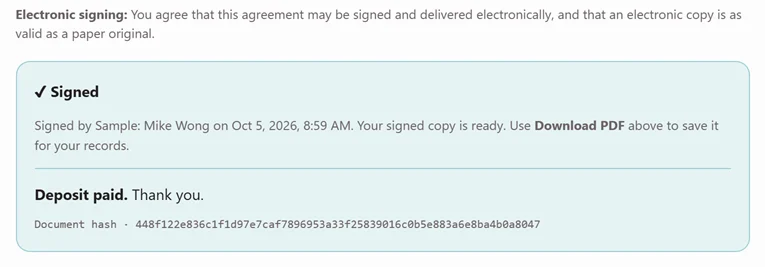
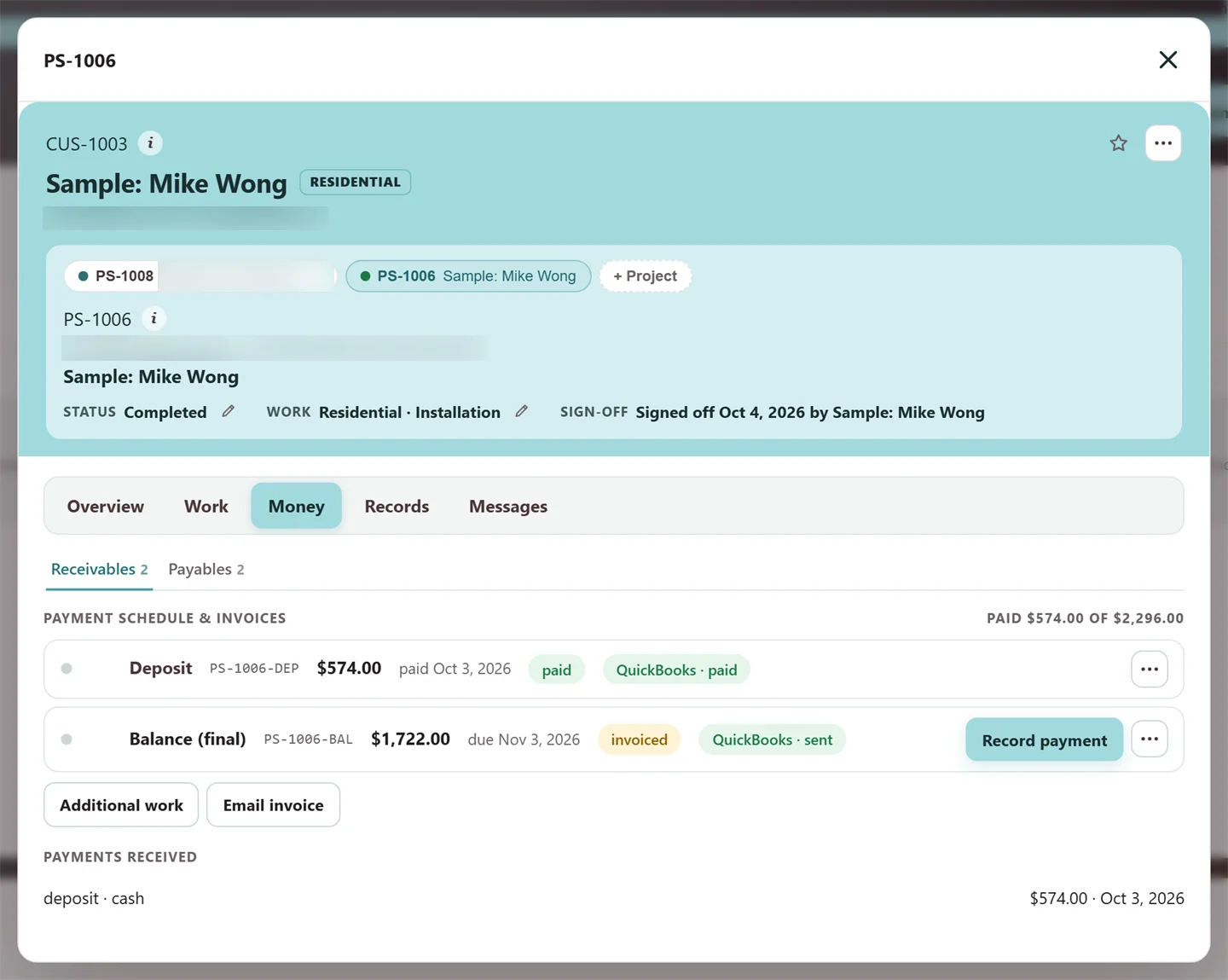
A custom system turns the accepted quote into a signed agreement and a deposit in one step. The client approves a change order on their phone with the new price. Each progress invoice is raised from the job, and QuickBooks stays in step. When the final invoice goes out, nobody has to check it against old emails.
Verdict: build, once you run several jobs at a time and change orders are normal.
A property management company
Here the record that matters is the building, not the deal: properties, units, owners, tenants, maintenance requests, vendors and owner statements. Dedicated property management software exists, and if one fits your portfolio, buy it.
Custom makes sense when your work sits between packages: a mix of residential and commercial buildings, your own way of handling maintenance, or owners who expect reports the package cannot produce. A custom system can take a tenant's request with photos, open a work order, send it to the right vendor, collect the vendor's invoice and add it to the owner's monthly statement, so nobody retypes the request four times.
Verdict: buy first; build when the package forces workarounds every week.
An engineering consultancy
A consultancy wins work with proposals that have phases, assumptions and fee schedules, then delivers it as projects with hours, milestones, drawings and revisions. A sales CRM tracks the proposal until it is won, then the real work moves somewhere else.
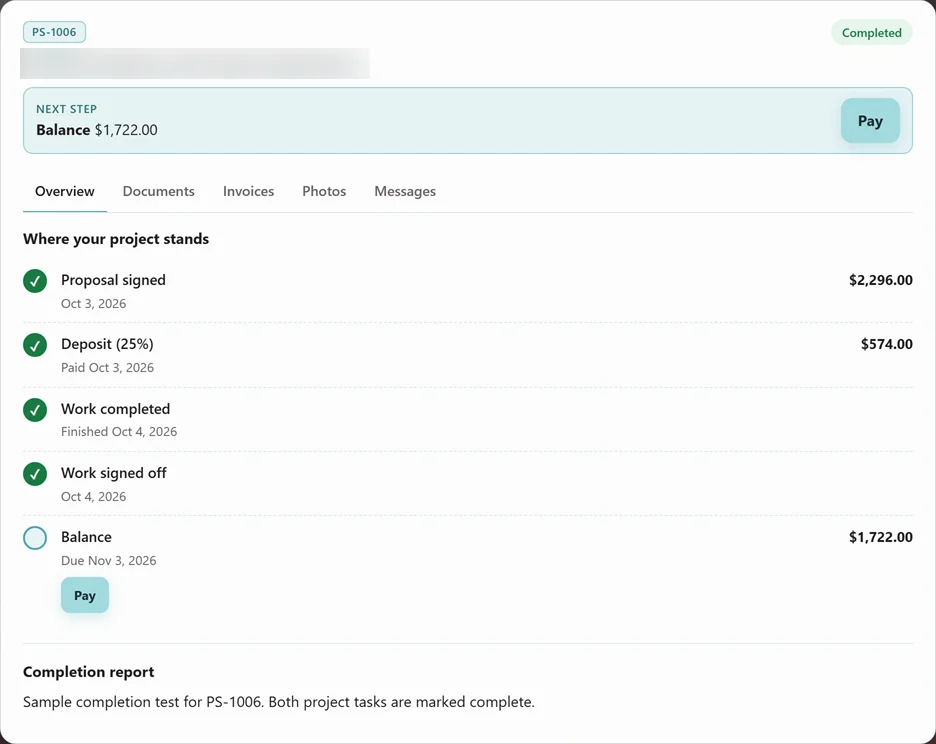
A custom system keeps one record from the first enquiry to the final invoice. The proposal is signed online and becomes a project with its phases. Staff log hours against each phase, a milestone invoice goes out when a phase is approved, and the client sees the status and the documents in their own portal.
Verdict: build when proposals, projects and billing live in separate tools and someone matches them up by hand.
Custom CRM vs Salesforce, Zoho and HubSpot
Custom CRM vs Salesforce. Salesforce can be shaped to almost any process, but by then you are paying for a large platform and for the people who customise it. For a small Canadian business, that means per-user fees in US dollars plus the setup work. A custom system leaves out the parts you will never use.
Custom CRM vs Zoho. Zoho is the price leader, and its higher plans add automation and custom functions. If your process fits the way Zoho works, it is hard to beat on cost. Custom wins when the steps after the sale matter more than the pipeline, or when Zoho would need so many custom fields and workarounds that your team ends up working around the software.
Custom CRM vs HubSpot. HubSpot is easy to start with and strong on marketing and email. The cost climbs at the Professional level, with a per-seat price and a one-time onboarding fee. Custom makes sense when what you need is the job side of the business, not more marketing tools.
Questions to ask before you decide
- What happens after a customer says yes, and how many tools does it pass through?
- How often is the same customer or job typed in again, and by whom?
- Which steps happen outside the CRM today: spreadsheets, email, paper?
- What would it cost to add five more people to your current subscription?
- Who needs to see what: the office, the field, your clients, the owners?
- Which tools must stay (QuickBooks, payments, email), and must the new system work with them?
If most of your answers are about the work after the sale, a custom system is worth pricing. If they are about the pipeline, a good off-the-shelf CRM is the better spend.
Where AI fits
Off-the-shelf CRMs sell AI too: Zoho lists AI agents on its plans, and HubSpot's AI features run on credits. Inside one product, that AI sees only what that product holds. In a custom system, an AI agent works across the whole system. It can read a new enquiry from your website, check the customer's history, draft the quote and prepare the agreement, then wait for you to approve it. That is the difference between an AI feature and a system that reads, decides and acts.

A CRM built around how your company already works
SimpliTechPro builds business systems on your own accounts: your website, a customer and job system shaped to your work, the tools you already use, and AI, working as one. You get the steps your business actually runs on, not a template you have to bend.
- Built around your steps: change orders and progress billing, work orders and owner statements, proposals with phases and milestone invoices, whatever your work runs on.
- One record from enquiry to payment: the quote, the signed agreement, the deposit, the job, the invoices and your client's portal stay connected.
- Works with your tools: QuickBooks, Square, Stripe, your email and calendar, and the software you already use.
- Your data in your accounts: customers, records and payments stay in accounts you own, and adding a person to the team doesn't add a licence fee.
- AI that does the first draft: an AI agent can read a new enquiry, draft the quote, book the visit and update the record for you to approve.
Sources (checked October 23, 2026)
- Zoho CRM pricing, Canadian dollars, yearly billing: zoho.com/crm/zohocrm-pricing.html
- HubSpot Sales Hub pricing, Canadian dollars: hubspot.com/pricing/sales
- Salesforce Sales pricing, Canada: salesforce.com/ca/sales/pricing
- Kolonell, "custom client portal cost for a services SME in Toronto" (published October 7, 2026)